⚡ Build publish-ready short-form videos in one workflow

Turn a topic into a faceless short-form videowithout appearing on camera

ReelForge Studio brings AI-assisted scripting, voiceover, scene visuals, captions, music and MP4 export into one short-form video workflow for platforms such as YouTube Shorts, TikTok and Instagram Reels. You remain in control of review, editing and publishing.

9:16Designed for vertical short-form video
3+Video formats included
AIAssisted creation workflow
6Scenes per video, auto-structured
Example ReelForge Studio video frame — Did You Know format
AI voiceover
12 natural voices
Auto-captions
word-by-word sync
MP4 export
1080×1920 ready to post
1topic in
1integrated creation workflow
6scenes, auto-written & structured
0need to appear on camera
Everything you need

Your entire faceless-video studio in one app

From a blank page to an exported short, ReelForge Studio brings the major creation steps into one guided workflow.

🧠

AI Script Generator

Type a topic (or nothing at all) and the AI writes a 6-scene, 130–170 word script structured for short-form storytelling with a hook, scene progression and closing payoff.

🎙️

AI Voiceover

12 natural neural voices with adjustable speed and pitch. Real per-word timing drives captions that land exactly when spoken.

🎨

AI Images & Doodles

Each scene gets a custom AI-generated image — or hand-drawn-style whiteboard doodles for explainer videos. No stock footage needed.

💬

Auto Word Captions

Bold, pop-style captions that highlight each word as it's spoken — a mobile-friendly style designed to make spoken words easy to follow.

🎬

One-Click Render & Export

Ken Burns motion, ambient sound, progress bar, end-card CTA — rendered to a 1080×1920 MP4, ready for YouTube Shorts, TikTok, Instagram Reels and Snapchat.

🚀

Trend Research

Uses available research signals to help explore topics and assemble a suggested content package with a title, hook, description, tags and keywords. Research suggestions do not guarantee reach or performance.

🧟

Horror Stories Mode

A dedicated horror narrator writes chilling short-form creepypasta — 6 scenes of escalating dread with an unsettling payoff.

✍️

Whiteboard Explainer Mode

Icon-driven doodle animation in a familiar faceless explainer style. Perfect for facts, finance and "how it works" niches.

📈

Content Validation & Audit

Where available, research-assisted checks review elements such as the hook, title, pacing, discoverability and call to action, then suggest revisions for you to review.

🔄

Auto-Pilot Scheduling

Scheduling tools can help organize posting times and queue projects for supported publishing workflows. Platform availability can change.

💾

Save & Publish

Save projects locally or online, and even connect your YouTube channel to upload straight from the app.

🎵

Ready-to-Post Kit

Every video ships with its title, description, hashtags and keyword set — everything a posting workflow needs, generated for you.


Three built-in formats

Pick the style that fits your niche

Each format provides a different creative structure for vertical short-form video.

Did You Know format exampleDid You Know

Did You Know

Mind-blowing facts with cinematic AI images and hook-first narration. The workhorse of faceless education channels.

Best for: facts, history, science, space, finance →
Horror format exampleHorror Stories

Horror Stories

A dedicated horror narrator writes chilling short-form stories with escalating tension and an unsettling payoff.

Best for: creepypasta, true-crime, dark history →
Whiteboard format exampleWhiteboard

Whiteboard Explainer

Icon-driven doodle animation — a classic faceless explainer style for visual step-by-step storytelling.

Best for: "how it works", listicles, myths, money →
How it works

From topic to uploaded short in 4 steps

1. Pick a format & topic

Choose Did You Know, Horror or Whiteboard — type a topic or leave it blank and let the AI surprise you.

2. Generate script & images

Generate a 6-scene short-form script and scene visuals or doodles, then review and edit the result.

3. Preview & tweak

Watch the short play with AI voiceover and word-synced captions. Edit any line or scene instantly.

4. Render & post

Export a 1080×1920 MP4 with title, description and hashtags ready — then post or schedule it.

Inside the studio

A real look at ReelForge Studio

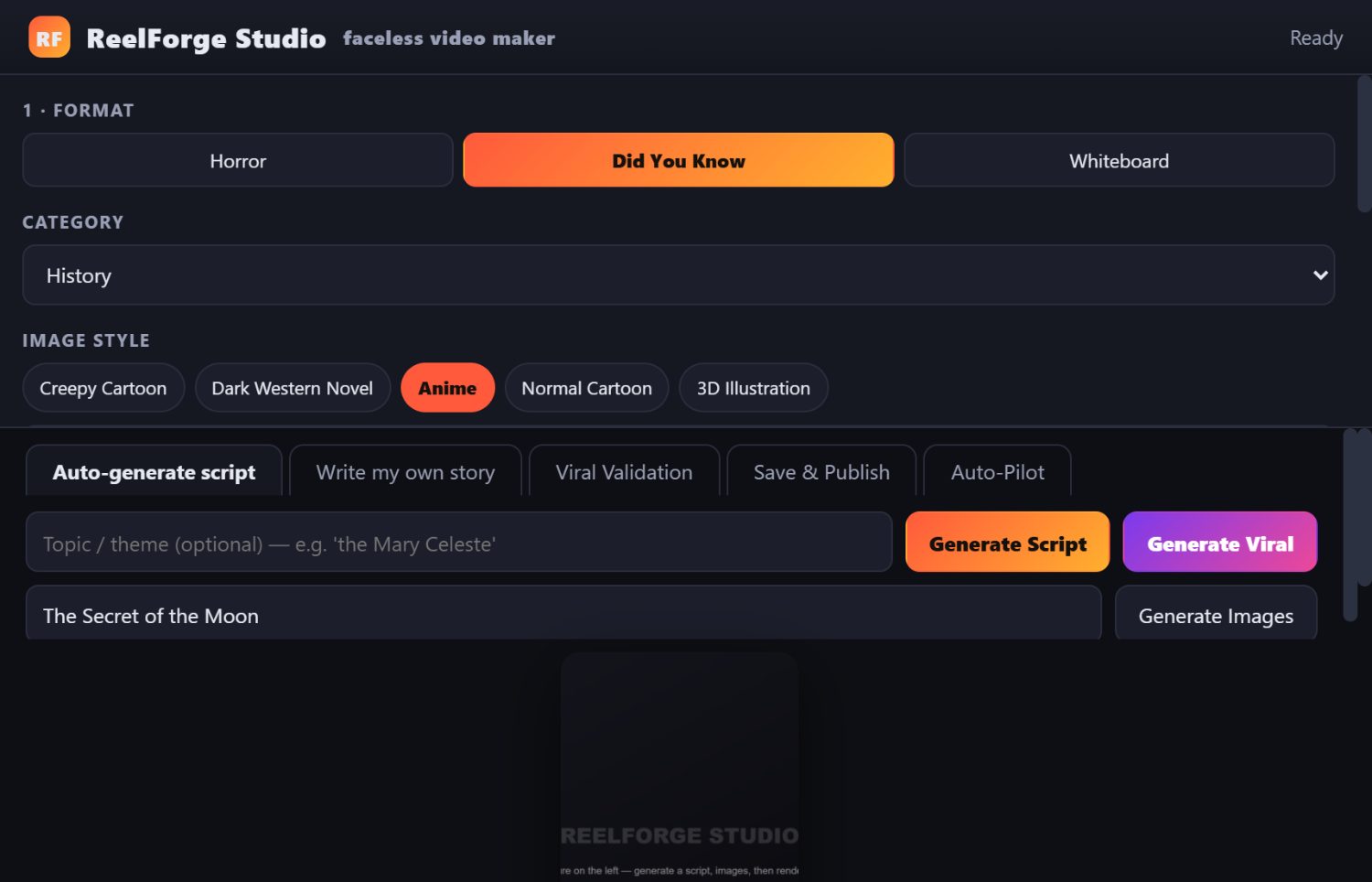
ReelForge Studio app interface
The full studio — format, style, script, scenes, preview and export, all in one screen.
  • 1
    Choose your formatDid You Know, Horror or Whiteboard — plus category, image style and voice.
  • 2
    Generate Script or Research TopicsAI assists with scripting, while research tools can suggest topics and positioning for you to review.
  • 3
    Scene-by-scene controlEdit narration, regenerate any image, set durations — full creative control.
  • 4
    Preview & renderReal-time preview with captions, then one-click MP4/MPEG export.
  • 5
    Auto-PilotOptional AI scheduling keeps your channel posting on the best days and times.
Get instant access

ReelForge Studio — Full Version

One-time purchase of the ReelForge Studio software license described on this page. There is no recurring ReelForge Studio subscription.

  • All 3 formats: Did You Know, Horror Stories, Whiteboard
  • AI-assisted scripts and topic-research tools
  • 12 AI voiceovers with full caption sync
  • AI images + whiteboard doodles for every scene
  • Content validation, audits and scheduling tools
  • 1080×1920 MP4 export — ready to post
  • Save, share & publish projects (incl. YouTube upload)
  • Updates provided while the purchased version is actively supported
60-DAY GUARANTEE

Your purchase is covered by a 60-day money-back guarantee. You may request a refund within 60 days of payment. This commercial guarantee does not limit any mandatory consumer rights that may apply.

$65 USD
one-time payment · digital software license
Get Instant Access
🔒 Secure checkout powered by Digistore24
Digital access/download instructions are provided electronically after purchase.

Digital delivery: access/download instructions are supplied electronically after successful payment. Third-party services used by optional AI or publishing features may have their own accounts, limits or terms.

Questions?

Frequently asked questions

Do I need any video editing or design skills?
No. ReelForge Studio is built for faceless content — you never appear on camera, record audio or touch a timeline. You pick a topic and the AI does the rest. You can still tweak every line and scene if you want.
What do I get after I buy?
ReelForge Studio is a digital software product. After successful payment, access or download instructions are provided electronically through the Digistore24 order-confirmation flow and/or the email address used at checkout. Check your spam folder if you do not see the message.
Is there a subscription or monthly fee?
ReelForge Studio is sold for a one-time payment of $65 USD with no recurring ReelForge Studio subscription. Some AI or publishing features may rely on third-party services, accounts, usage limits or availability that are separate from this purchase.
Which platforms can I post to?
The exported MP4 is 1080×1920 (9:16) and uploads to YouTube Shorts, TikTok, Instagram Reels, Snapchat Spotlight and Facebook Reels. The app even includes a YouTube upload flow and a posting schedule.
Can I use the videos commercially?
Commercial use of exported videos is permitted under the ReelForge Studio license, subject to applicable law, the rights in any source material you use, third-party service terms and the policies of the platform where you publish.
What are the system requirements?
A current supported browser and a stable internet connection are required. Some AI or publishing functions may depend on supported third-party services and their availability.
What if it doesn't work for me?
You are covered by our 60-day money-back guarantee. Contact support@esr.mobi within 60 days of payment with your order details to request a refund. See the Refund Policy for details.
Can I earn money promoting ReelForge Studio?
Affiliates receive 50% commission on eligible referred sales. See the Affiliate Support page for the Digistore24 promolink format, advertising materials and partnership details.

💸 Turn your audience into income

Join the ReelForge Studio affiliate program and receive 50% commission on eligible referred sales, with ready-to-use promotional materials provided.

Become an affiliate →

Build your next short-form video in one workflow

Bring scripting, voice, visuals, captions and export together in one faceless-video workflow.

Get ReelForge Studio Now